Element & Matrix — The Communication Layer

TL;DR
Element (backed by the Matrix protocol) is the communication interface where Smartup Zero participants gather to deliberate, coordinate, and command the experiment. It replaces proprietary chat platforms with a sovereign, open‑source layer that maps every conversation directly onto the governance structure of the ledger.
Because all discussions, decisions, and commands flow through this single, structured surface, we can measure indicators like environmental perception, threat‑recognition speed, and coordination friction directly from chat logs—turning everyday communication into telemetry for Engelbart’s indicators.
🟢 Research Status: Operational Apparatus — Active communication layer used daily by all Smartup Zero participants.
Why Not Slack or Discord?
Traditional startups default to Slack, Discord, or Microsoft Teams. For a Smartup—an experiment investigating Collective IQ—these are fundamentally incompatible for three reasons:
- Proprietary Lock-in: You do not own your organization's history; the platform does.
- Attention Extraction: They are designed with algorithms, badges, and notifications meant to hijack human attention, reducing deep work.
- Top-Down Control: Their permission architectures are hardcoded for traditional corporate hierarchies (Admin → Manager → User).
The Solution: We deployed our own Synapse server using the open-source Matrix protocol, accessed via the Element web client. We own the server, we own the data, and we control the architecture.
But ownership is not the only reason. This setup makes collective behaviour observable. Every room, every thread, every command becomes a data point in the experiment. We can see how quickly a threat is noticed, how often knowledge is shared, and whether coordination becomes smoother over time—all without surveys.
The "Isolated Island" Architecture
Matrix is famous for its "federation"—the ability for servers to talk to one another seamlessly. We turned it off.
Smartup Zero operates as a strictly defederated island.
A Controlled Laboratory
To run a clean sociotechnical experiment, you must control the variables. By isolating our server, we guarantee that every single user inside the environment is a verified, licensed Smartup Owner. There is no spam, no external noise, and no shadow-participants.
Security & Access Rules:
- No Public Sign-ups: Access to
owners.smartup0.orgrequires a single-use cryptographic registration token generated by a Team Captain upon license purchase. - No External Federation: Our endpoints return
404to the outside Matrix network. We cannot message outside servers, and they cannot message us. - EU-Sovereign: Hosted entirely on a dedicated Hetzner VPS in Germany.
Mapping the Ledger to the Chat
In most companies, chat channels are created randomly (#random, #watercooler, #project-x). In SmartupOS, the chat architecture is mathematically bound to the Ledger.
We use Matrix Spaces (folders) and Rooms (channels) to mirror the 6 Groups of Productivity perfectly.
flowchart TD
    subgraph Matrix ["Element Interface (owners.smartup0.org)"]
        F[Space: 1_general_forum<br/>All Citizens]
        W[Space: 2_workplace<br/>Workers Only]

        T1[Subspace: 3_1_leadership_team]
        T2[Subspace: 3_3_developer_team]

        R1[Room: 5_3_0 Onboarding Objective]
        R2[Room: 6_1_3_0 Script Refactor Task]

        F --> W
        W --> T1
        W --> T2
        T2 --> R1
        R1 --> R2
    end
Access by License Tier
Your physical access to these spaces is governed by your License (enforced by Engelbot):
- Watch License: Auto-joined to
1_general_forum. You can observe, vote, and debate, but you cannot see the internal machinery of the teams. - Work/Campaign License: Auto-joined to both
1_general_forumand2_workplace. From the workplace, you are granted access to your specific Team subspaces based on your applied Roles.
The User Experience
To a citizen, SmartupOS does not look like a complex array of Python scripts and CSV files. It looks like a clean, focused chat app.
-
The General Forum
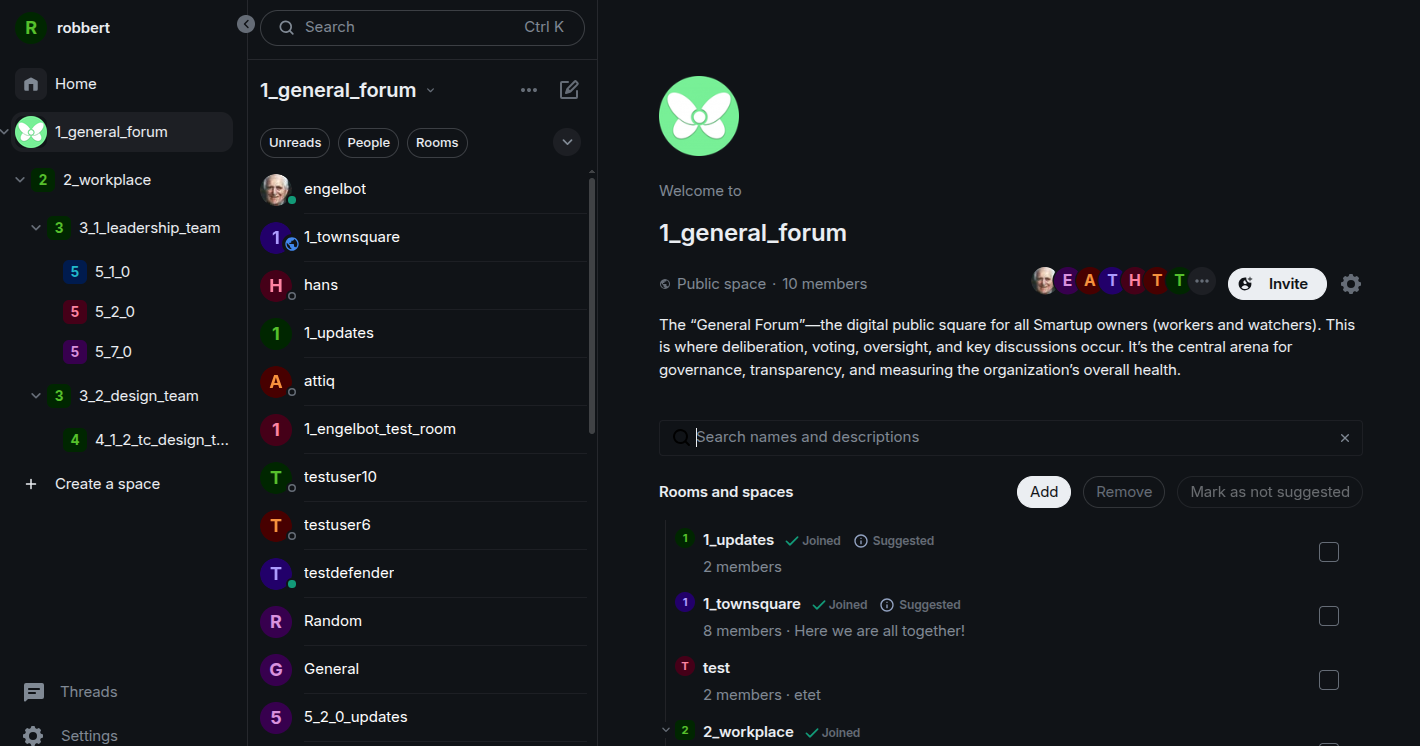
The public square. Where cross-team announcements are made and strategic votes take place.
-
Commanding Engelbot
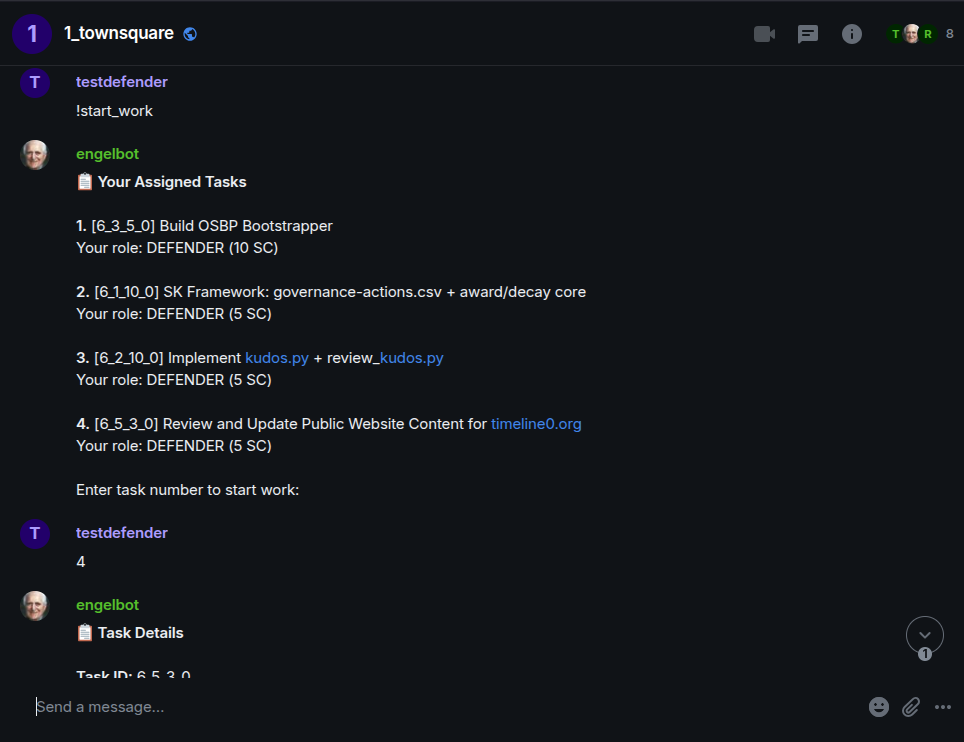
The command line for non-coders. Citizens use natural language
!commandsin specific rooms to interact with the Ledger.
How Element Feeds the Experiment
Because all communication is structured into governance rooms and command channels, we can extract precise metrics for Engelbart’s indicators:
| CIQ Indicator | What We Observe in Element |
|---|---|
| 5. Perception | Frequency and depth of environmental‑scanning discussions in dedicated rooms |
| 6. Threat Recognition | Time from external event mention → creation of a response task |
| 8. Coordination | Ratio of coordination messages vs. execution updates; rework discussions |
| 4. Self‑Understanding | How accurately room descriptions match actual activity in those rooms |
Element is not just a chat app. It is the sensor array for the social dimension of the experiment.
Under the Hood (For Engineers)
For those interested in the technical deployment, our Media Team Infrastructure relies on a highly efficient, Dockerized stack.
View Infrastructure Details
The Stack:
- OS: Ubuntu 24.04 LTS (Hetzner Cloud VPS)
- Server: Matrix Synapse (PostgreSQL 15 backend)
- Client: Element Web (served statically)
- Proxy: Caddy (Reverse proxy with automatic Let's Encrypt SSL)
Routing Architecture:
smartup0.orgroutes to the public landing page and handles the raw Matrix Client API.owners.smartup0.orgserves the Element Web interface to our citizens.- Only ports 22 (SSH), 80, and 443 are open to the world. All configuration is done via local Ed25519 keypair SSH access.
Next Step: Meet the Midfielder
Element is just the interface. To understand how typing a message in a chat room actually updates our Git-based ledger, you need to meet the orchestrator connecting them both: Engelbot.
Ways to Participate
-
Join Smartup Zero
Become an participant in the first experiment.
-
Start Your Own Smartup
Take SmartupOS and run your own experiment.
-
Sponsor the Research
Support Timeline0 and Smartup Zero through funding.
-
Collaborate as Researcher
Work on the research programme itself.